The CRM that does the work.
Orderbook logs every email and meeting, writes your follow-ups, finds new leads overnight and preps every deal. Your team just sells.
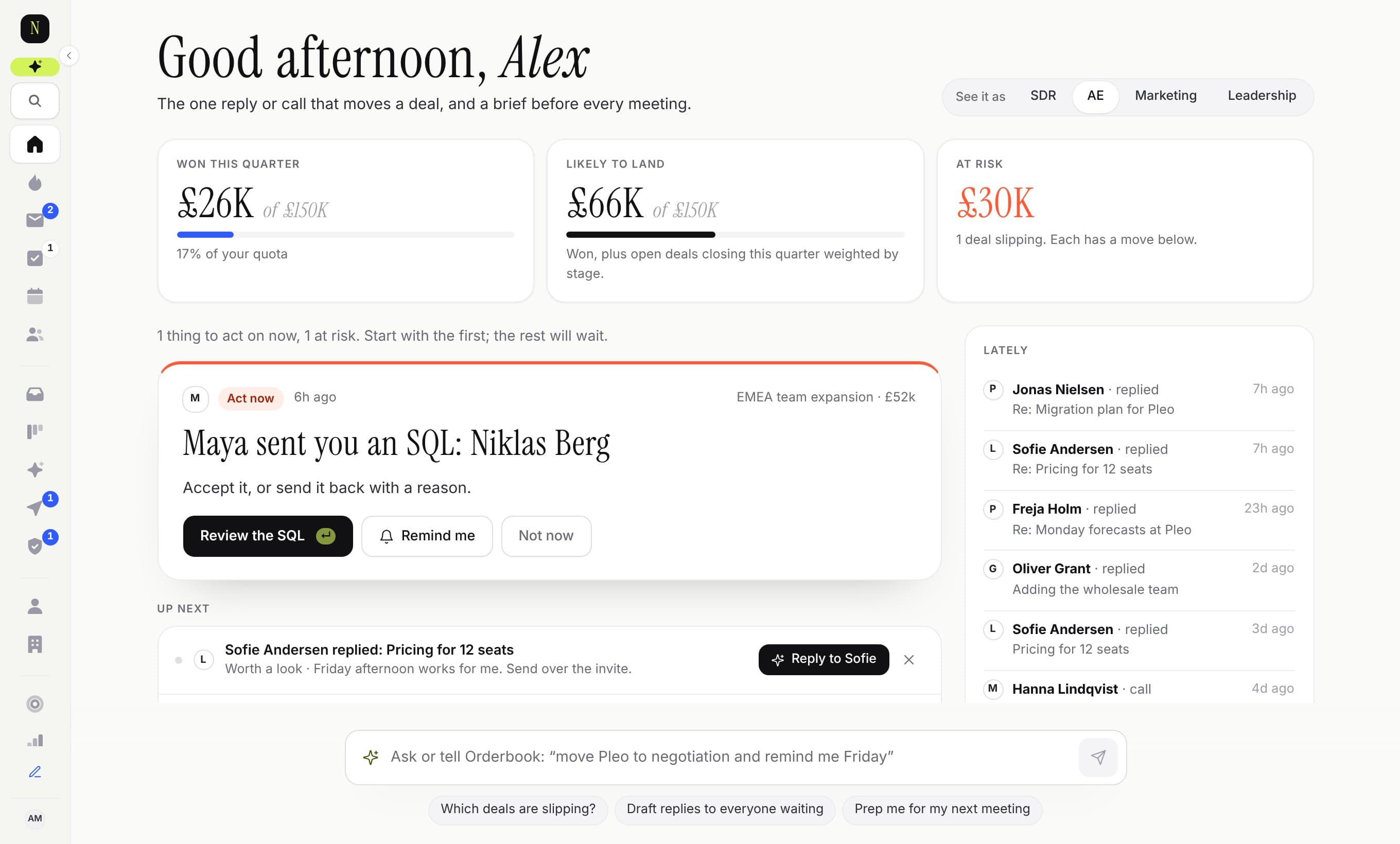
Keep your CRM. Stop updating it.
Connect Salesforce or HubSpot in two minutes. Orderbook works from your inbox and calendar and writes the updates back: stages, close dates, new contacts and every email and meeting on the right record. Your reports keep working. Nothing to migrate, nothing to retrain.
A day with Orderbook
Most CRMs wait for you to feed them. This one comes to you with the work already done.
- 08:00
Your morning brief
Who replied, which deals are going cold, what’s on today and where you are against quota. By email, Slack or on your phone.
- 08:05
Approve, don’t type
Replies, follow-ups and deal updates are already drafted. Swipe through them: approve, edit or skip. Twenty actions in three minutes.
- 10:30
Meetings write themselves up
Record the call or drop in the transcript. You get the summary, next steps, tasks, a recap email and the deal fields updated.
- 14:10
Buying signals, as they happen
A champion opened the proposal three times. A target account is on your pricing page. You hear about it with the next step suggested.
- Overnight
New leads, researched
Describe your ideal customer once. Orderbook finds matching companies and people, reads up on them and drafts the first email.
A reason to open it, whatever your job
SDRs see who to contact with the first line written. AEs see the reply that moves a deal. Marketing sees the pipeline it made. Leaders see where the quarter will land. Each starts with one thing to do.
- “What deals should I focus on today?”
- “Prep me for my next meeting”
- “Which deals are at risk?”
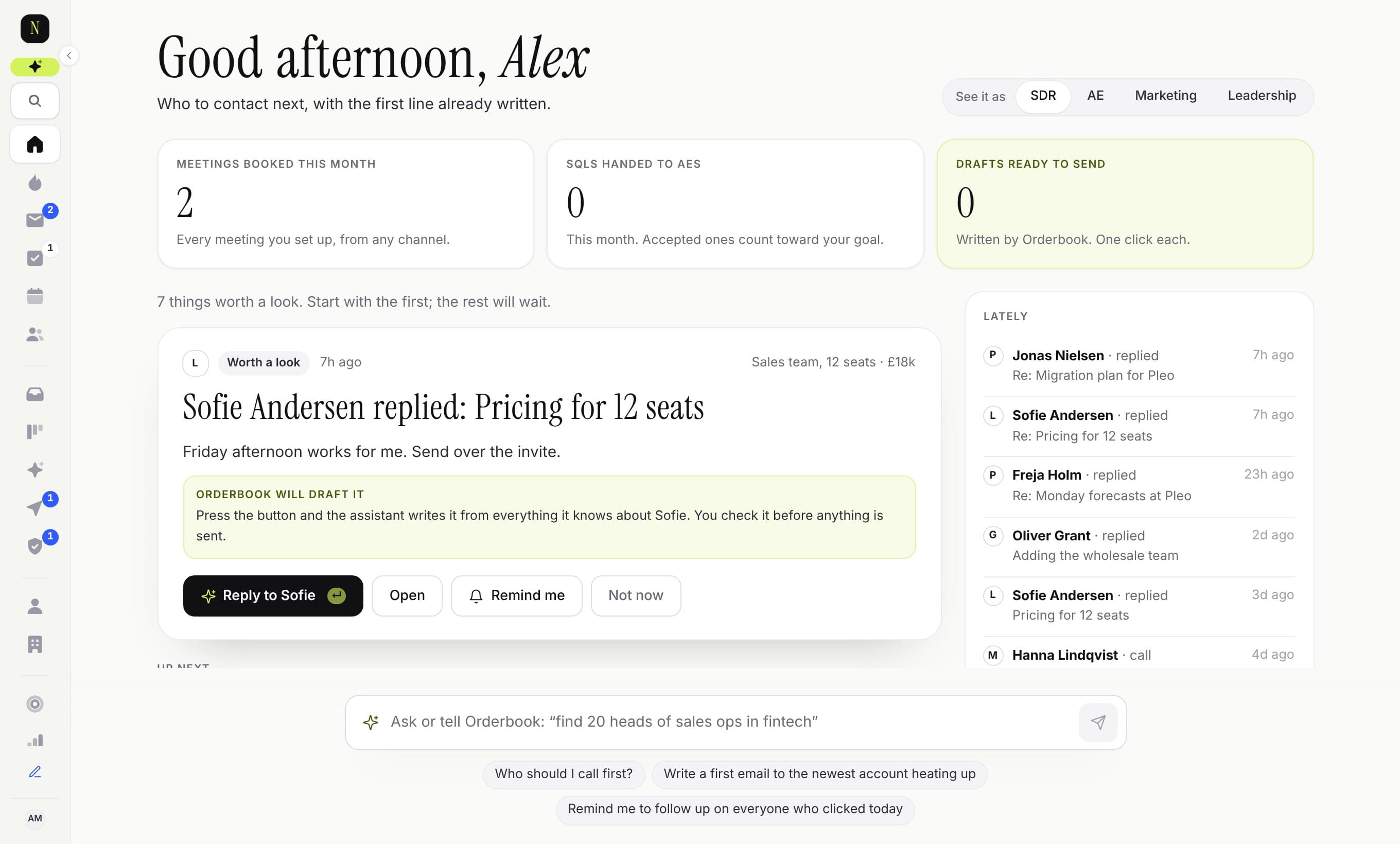
A pipeline that tells you the truth
Every deal on one river, by stage and the week it should close. See where the quarter lands, what’s slipping and where buyers are active. Drag a deal to move it.
- Health from activity, not gut feel
- Forecast by quarter, owner and territory
- A coach that learns from your wins
The old way, and the Orderbook way
A traditional CRM
- You log calls, emails and meetings
- You remember who to follow up with
- You build lead lists by hand
- You write up every meeting
- You find out a deal died at month end
- You pay extra for every add-on
Orderbook
- It logs them itself
- The follow-up is drafted and waiting
- New, researched leads arrive overnight
- The summary, tasks and recap are done
- You’re told it’s cooling while there’s time
- AI, Plays and forecasting are in the plan
Everything a sales team needs, in one place
No separate tools for Plays, notes, quotes and enrichment, and no add-ons to unlock the good parts.
Inbox and calendar sync
Gmail and Outlook. Only conversations with people in your CRM, logged on the right record automatically.
Plays
Multi-step outreach with AI-written openers, sending windows and daily limits. Stops the moment someone replies.
Pipeline and forecast
Board, list and forecast views with deal health that flags what’s slipping before it slips.
Deal coach
Learns from your won and lost deals and tells you what this one is missing.
Deal rooms
One shared page per deal for the buyer: the plan, the documents, the people. You see who opened what.
Quotes and e-signature
Build a quote from your products, send a link, get it signed. The deal moves to won by itself.
Workflows in plain English
“When a deal hits proposal, tell the team and create a task for legal.” Type it, check it, turn it on.
Reports by asking
Ask for “win rate by industry this quarter” and get the chart. Save it for the team.
Works with your tools
REST API, Slack and Teams alerts, a Chrome extension for LinkedIn, and a connector for Claude.
Simple pricing, AI included
Pay per person. Every plan includes email sync and the morning brief.
Free
For one person, on top of your CRM.
£0for one person, for good
Keep your CRM. No card needed.
Start free- The Desk: what to do next, every morning
- Two-way sync with Salesforce or HubSpot
- Gmail or Outlook, captured automatically
- Deals and contacts updated for you
- 50 AI drafts a month
Starter
The CRM basics, done properly.
£12.50per seat / month
£150 per seat, billed yearly
Start free trial- Leads, people, companies and deals
- Gmail and Outlook sync, captured automatically
- The Open, morning brief and Autopilot follow-ups
- 100 AI actions and 50 data credits per seat each month
Pro
Most popularEverything you need to book meetings and close.
£29.17per seat / month
£350 per seat, billed yearly
Start free trial- Everything in Starter
- Sequences with AI-written openers
- Forecasting, deal health and What works
- Job-change and account alerts: 100 people and 100 accounts per seat
- 1,000 AI actions and 250 data credits per seat each month
Scale
Orderbook does the work for you.
£54.17per seat / month
£650 per seat, billed yearly
Start free trial- Everything in Pro
- Autopilot prospecting: new leads found and researched overnight
- Meeting notetaker
- Job-change and account alerts: 300 people and 250 accounts per seat
- 5,000 AI actions and 600 data credits per seat each month
Enterprise
For revenue teams that run on it.
From £95per seat / month
Annual, from 20 seats
Talk to us- Everything in Scale
- SSO, SCIM provisioning and audit export
- Pooled data credits, custom tracking limits and buyer intent data
- EU or UK data residency, DPA and 99.9% uptime commitment
- A named success manager and onboarding
Data credits pay for contact details and company data from Orderbook’s own data: a work email costs 1, a phone number 5, and you only pay when one is found. Bring your own Apollo, Lusha or ZoomInfo and those lookups are free. Extra credits from £40 per 1,000.
Every team trial gets the full product: 3 days with no card, or 14 days if you add one. Nothing is charged until the trial ends; on your own, you drop to Free instead. Prices exclude VAT.
Questions
Do we have to leave Salesforce or HubSpot?
No. Connect it and keep it. Orderbook reads your accounts, contacts and deals, and writes back what changes: stages, values, close dates, new contacts, and every email, call and meeting on the right record. Your reports and dashboards keep working. If you later want Orderbook to be the whole CRM, everything is already here.
What does Orderbook write into our CRM?
Only what you’d have typed yourself: deal updates you approve, new contacts from conversations, and activity logged on the right record. It never deletes anything there, and an admin can switch it to read-only in one click.
Is it a CRM?
Yes. People, companies, deals, pipeline, forecasting and reporting are all here. The difference is that Orderbook does the data entry and the routine follow-up for you, and asks before anything is sent.
Does the AI send emails without asking?
Not unless you tell it to. Drafts wait in your Autopilot feed until you approve them. Plays you set up run on their own, within your sending window and daily limit.
What if we don’t use a CRM yet, or use Pipedrive or a spreadsheet?
Then Orderbook is your CRM. Import from Pipedrive in one click or upload CSV files; duplicates are matched and merged as they come in.
What happens to our email?
Only conversations with people already in your CRM are synced. Admins can restrict sharing to subject lines. Your data isn’t used to train AI.
What does it cost?
Nothing for one person: Free keeps the Desk, inbox and calendar capture, CRM sync and 50 AI drafts a month, for good. Teams pay per seat, with every feature free for the first 3 days (14 with a card).
What happens when the trial ends?
On your own, you drop to Free and keep going. A team chooses a plan to carry on; if it doesn’t, the workspace becomes read-only and you can still export everything.